
How to Repurpose a Podcast Episode Into 30+ Pieces of Content
A step-by-step workflow to turn one podcast episode into clips, social posts, show notes, blog articles, and newsletters — without spending hours editing.
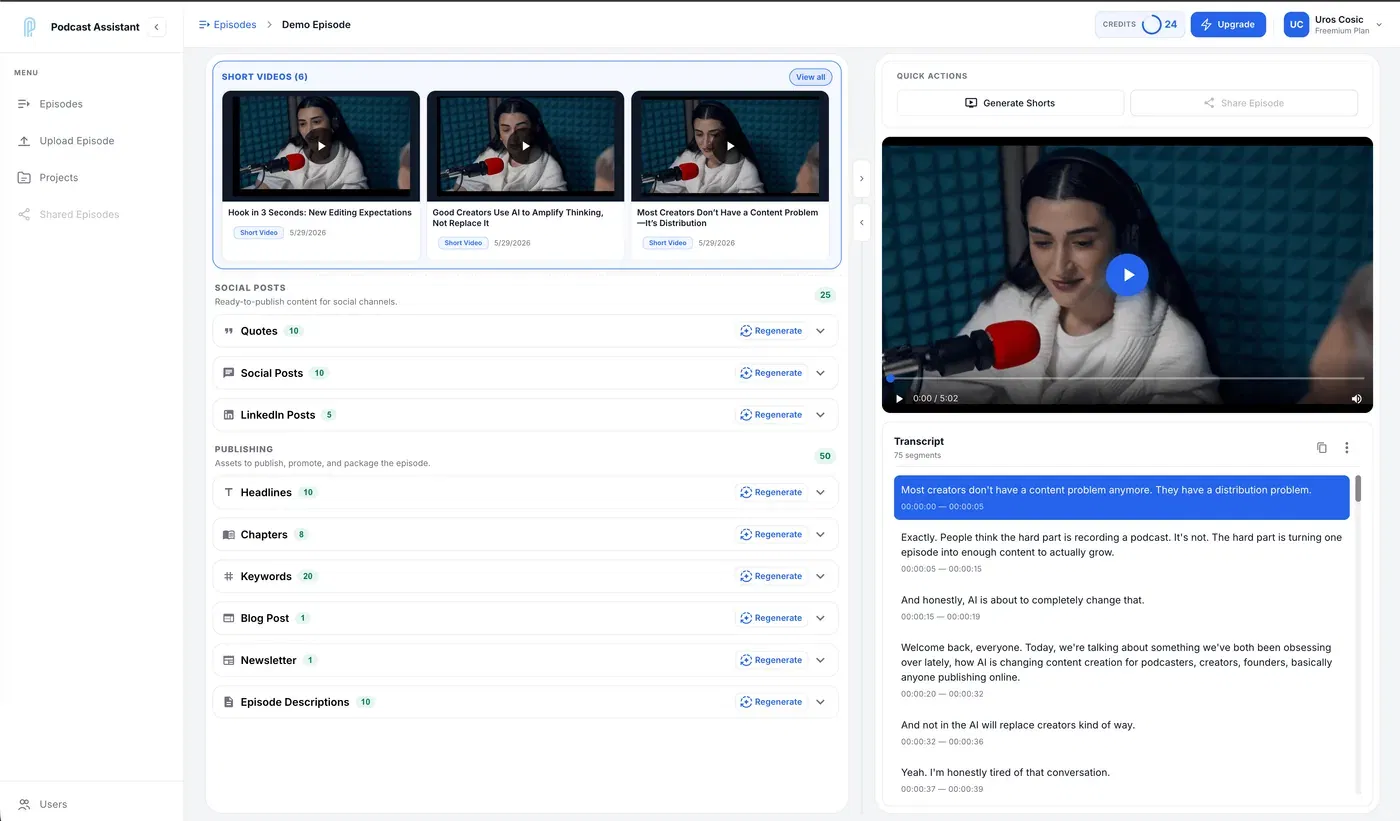
You already did the hard part: you recorded a great episode. But if that episode only ever lives as one audio file on one platform, you are leaving most of its value on the table. The creators who grow fastest are not recording more — they are repurposing smarter.
This guide walks through a repeatable workflow to turn a single episode into 30+ pieces of content across video, social, search, and email. No extra recording. No blank-page rewriting.
Why repurposing beats publishing more
Every episode contains dozens of quotable moments, teachable ideas, and search-friendly topics. Publishing the raw audio once captures a fraction of that. Repurposing lets you:
- Meet your audience where they already are — TikTok, LinkedIn, YouTube Shorts, your newsletter, and Google.
- Compound your reach — a single insight can become a clip, a quote graphic, a blog section, and an email.
- Save hours — the work shifts from creating from scratch to editing and approving.
The goal is simple: do the thinking once, then distribute it everywhere.
Step 1: Start with an accurate transcript
Text is the foundation of repurposing. Once your episode is transcribed, every other format becomes a copy-paste-and-polish job instead of a from-scratch project.
A good transcript should include speaker labels and accurate timestamps so you can quickly find the best moments. If you want to skip the manual typing, you can convert your podcast to text automatically and get a searchable transcript in minutes. (New to this? Start with how to transcribe a podcast.)
Step 2: Pull the highlight moments
Read (or skim) the transcript and mark the moments that stand out:
- Strong opinions or hot takes
- Clear, quotable one-liners
- A useful framework or step-by-step explanation
- A surprising stat or story
These highlights are the raw material for everything else. You are looking for 10–15 moments from a typical 45–60 minute episode.
Step 3: Cut short video clips
Short-form video is the single highest-leverage format for discovery in 2026. Each highlight moment can become a vertical clip for TikTok, Reels, and YouTube Shorts.
Aim for clips that are 20–60 seconds, captioned, and framed for mobile. If editing clips by hand sounds painful, you can generate short videos from your episode and get captioned, ready-to-post clips automatically. For the full breakdown, see how to make podcast clips for TikTok, Reels & Shorts.
One 45-minute interview can realistically produce 8–12 short clips.
Step 4: Write social posts for each platform
The same highlight works differently on each network. A LinkedIn post leans into the insight and a lesson; an X post is punchier; a Facebook post is more conversational.
Instead of rewriting the same idea five times, turn your podcast into social media posts tailored per platform, then tweak the voice to match yours. For a full plan, read how to promote a podcast on social media.
A single episode can comfortably produce:
- 3–5 LinkedIn posts
- 5–10 short X posts
- 2–3 Facebook posts
Step 5: Generate show notes, chapters, and episode SEO
Show notes and chapters improve the listening experience and help your episode get found. Chapters let listeners jump to the part they care about, and a keyword-rich description helps your episode surface in search.
You can generate chapters, headlines, descriptions, and keywords directly from the transcript, so your episode page is optimized without manual SEO work. Go deeper with how to write podcast show notes and the podcast SEO guide.
Step 6: Turn the episode into a blog post and newsletter
This is the step most podcasters skip — and it is where long-term search traffic lives. A blog post from each episode keeps bringing in new listeners from Google months after you publish. A newsletter keeps your existing audience warm between episodes.
Rather than writing both from scratch, create a blog post and newsletter from your episode, grounded in what you actually said, then edit for your brand voice. Step-by-step: how to turn a podcast into a blog post.
Step 7: Standardize your inputs
Repurposing breaks down when every episode is a different file format, volume level, or quality. Before any of the steps above, it helps to clean up and standardize your raw audio.
Smart file processing handles mixed formats and quality automatically, so the rest of your workflow stays consistent.
A realistic content count from one episode
Here is what a single 45–60 minute episode can produce with this workflow:
- 1 full transcript
- 8–12 short video clips
- 10–15 social posts across platforms
- 1 set of chapters + episode description + keywords
- 1 blog article
- 1 newsletter draft
That is comfortably 30+ assets from one recording — and most of them come from the same transcript you generated in Step 1.
Make it a system, not a one-off
The difference between podcasters who burn out and those who grow is systems. Repurposing should not depend on motivation or free time on a Sunday. Build it into your publishing routine so every episode automatically becomes a month of content — the foundation of how to grow a podcast audience.
If you want to run this entire workflow from a single upload, Podcast Assistant turns one episode into clips, posts, show notes, blogs, and newsletters — automatically.
Turn your next episode into 30+ pieces of content
Upload once and get clips, social posts, show notes, blogs, and newsletters — automatically.